🛠️ Redux Basics
What is Redux?
Redux is a state management library 💾 that helps you manage the global state of your application in a predictable way. It works well with React ⚛️ but can be used with other frameworks too!
Think of Redux as a centralized store 🏪 where all your app’s data lives. Instead of passing props down multiple levels 🏗️, you can access and update state globally using actions ▶️ and reducers 🔄.
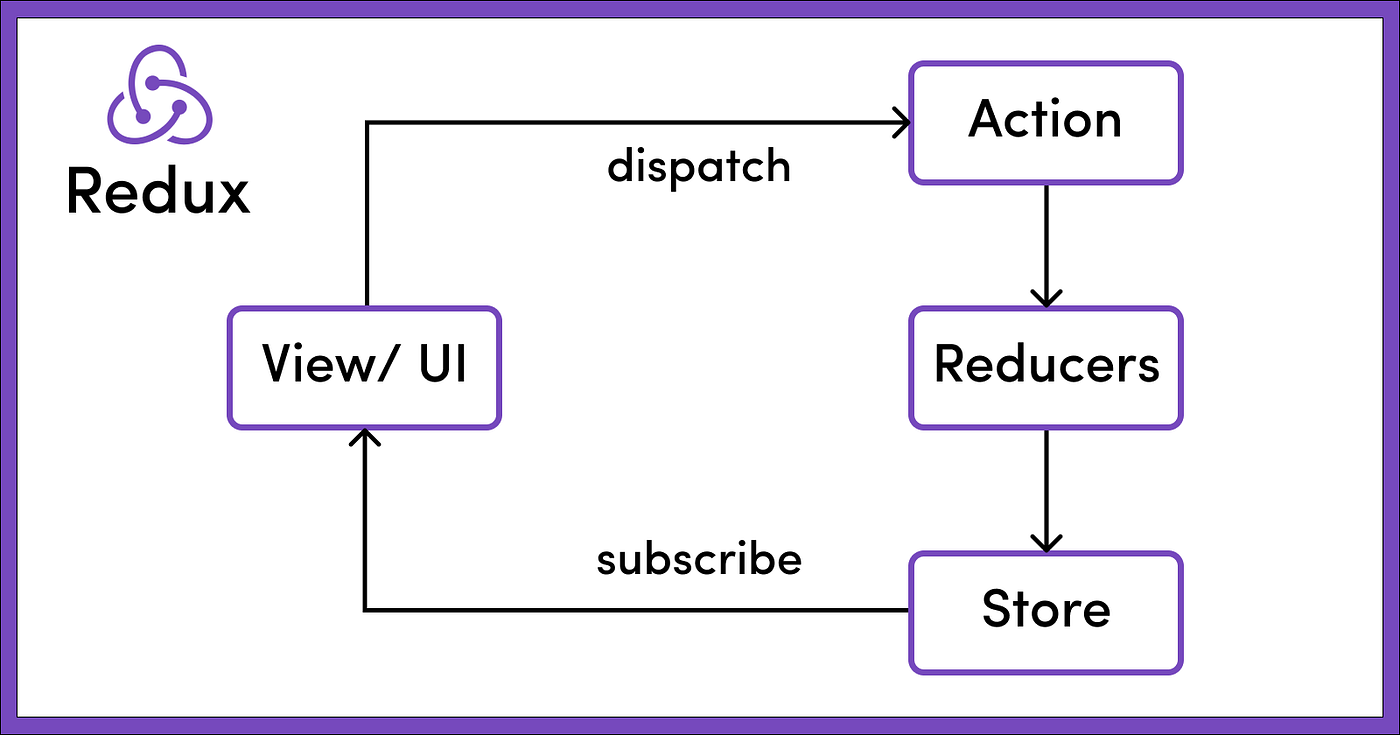
-
Store 🛒: A centralized place to hold the application's state.
-
Actions ▶️: Objects that describe state changes.
-
Reducers 🔄: Functions that specify how the state changes in response to actions.
-
Dispatch 🚀: A function used to send actions to the reducers.
-
Subscribe 👂: Allows the UI to listen for state updates.
-
View/UI (Component) 🎨 → Dispatch 🚀
- The user interacts with the UI 🎭, triggering an event.
- This event dispatches an Action 🎬 using
dispatch(action).
-
Actions ▶️ → Reducers 🔄
- The dispatched action is sent to the Reducers 🔄.
- Actions are plain JavaScript objects 📜 that describe what happened (e.g.,
{ type: 'INCREMENT' }).
-
Reducers 🔄 → Store 🏪
- Reducers are pure functions 🧼 that take the current state 📦 and the action 🎬, then return a new state.
- The new state is stored in the Redux Store 🏪.
-
Store 🏪 → View/UI 🎨 (Subscription 👂)
- Components subscribe 📡 to the store to receive updates.
- When the store updates, the UI 🔄 re-renders with the new state.
Why Redux Toolkit?
Redux is powerful but can be verbose 📝, requiring a lot of boilerplate code. That’s where Redux Toolkit (RTK) 🛠️ comes in!
✅ Simpler & Less Boilerplate – Reduces the amount of code needed ✂️
✅ Built-in Best Practices – Encourages clean architecture 🏗️
✅ Better Performance – Uses Immer.js 🧈 for efficient state updates
✅ Includes Middleware – Comes with Redux Thunk 🌀 for async logic
💾 Installation
npm i @reduxjs/toolkit react-redux
⚙️ Redux Configuration
🍰 Creating a Slice & Reducers
// redux/features/tasks/taskSlice.ts

import { createSlice, PayloadAction } from "@reduxjs/toolkit";

const initialState: { value: number } = { value: 0 };

export const counterSlice = createSlice({
  name: "counter",
  initialState,
  reducers: {
    increment: (state) => {
      state.value += 1;
    },
    decrement: (state) => {
      state.value -= 1;
    },
    incrementByAmount: (state, action: PayloadAction<number>) => {
      state.value += action.payload;
    },
    decrementByAmount: (state, action: PayloadAction<number>) => {
      state.value -= action.payload;
    },
    reset: (state) => {
      state.value = 0;
    }
  }
});

export const {
  increment,
  decrement,
  incrementByAmount,
  decrementByAmount,
  reset
} = counterSlice.actions;

export default counterSlice.reducer;
🛒 Setting Up the Reducer on the Store
// redux/store.ts

import { configureStore } from "@reduxjs/toolkit";
import { taskSlice } from "../features/tasks/taskSlice";

// 🏪 Creating the Redux store and adding reducers
export const store = configureStore({
  reducer: {
    tasks: taskSlice.reducer // 🔄 Adding the task reducer to the store
  }
});

// 🔹 Defining types for better TypeScript support
export type AppDispatch = typeof store.dispatch;
export type RootState = ReturnType<typeof store.getState>;
🏗️ Creating a wrapper component for Redux Provider
// redux/provider.tsx

import { Provider } from "react-redux";
import { store } from "./store";

export function ProviderWrapper({ children }) {
  return <Provider store={store}>{children}</Provider>;
}
🔄 Wrapping the App with Redux Provider
// main.tsx

import App from "./App.tsx";
import { ProviderWrapper } from "./redux/provider.tsx";
import { createRoot } from "react-dom/client";

createRoot(document.getElementById("root")!).render(
  <ProviderWrapper>
    <App />
  </ProviderWrapper>
);
- When using Next.js import in the Root Layout
// app/layout.tsx

import ProviderWrapper from "@/redux/provider";
import { store } from "@/redux/store";

export default function RootLayout({
  children
}: {
  children: React.ReactNode;
}) {
  return (
    <html lang="en">
      <body>
        <div>
          <ProviderWrapper>{children}</ProviderWrapper>
        </div>
      </body>
    </html>
  );
}
👆 useSelector and 🔄useDispatch
// components/TaskList.tsx

import { useSelector, useDispatch } from "react-redux";
import { deleteTask } from "../features/tasks/taskSlice";

export function TaskList() {
  const tasksState = useSelector((state: TasksState) => state.tasks);
  const dispatch = useDispatch();

  const handleDelete = (taskId: string) => {
    dispatch(deleteTask(taskId));
  };

  return (
		<ul>
        {tasksState.map((task: Task) => (
          <li key={task.id}>
            <h2 >{task.title}</h2>
            <p>{task.description}</p>
            <p>{task.completed ? "Completed" : "Not completed"}</p>
            <button onClick={() => handleDelete(task.id)}>Delete</button>
          </li>
        ))}
    </ul>
  )
🪝 Custom Hook for Type Safety
- To ensure TypeScript support ✅ is recommended to use a custom hook to select state 🔄 and dispatch actions ▶️
// hooks.ts

import { TypedUseSelectorHook, useDispatch, useSelector } from "react-redux";
import { AppDispatch, RootState } from "./store";

// 🚀 Typed versions of useSelector and useDispatch for better TS support
export const useAppSelector: TypedUseSelectorHook<RootState> = useSelector;
export const useAppDispatch = () => useDispatch<AppDispatch>();
🔍 RTK Query
Creating an API service with RTK Query
// redux/services/userApi.ts

import { createApi, fetchBaseQuery } from "@reduxjs/toolkit/query/react";

export const userApi = createApi({
  reducerPath: "userAPI", // 🗂️ Unique key for the slice of state
  baseQuery: fetchBaseQuery({
    baseUrl: "https://jsonplaceholder.typicode.com/" // 🌐 Base URL for API requests
  }),
  endpoints: (builder) => ({
    getUsers: builder.query<User[], null>({
      query: () => "users" // 🚀 Fetch all users from the endpoint
    }),
    getUserById: builder.query<User, { id: string }>({
      query: ({ id }) => `users/${id}` // 🚀 Fetch a user by ID from the endpoint
    })
  })
});

// 🌟 Exporting hooks for component usage
export const { useGetUsersQuery, useGetUserByIdQuery } = userApi;
We add the userApi to the configureStore()
// redux/store.ts

import { setupListeners } from "@reduxjs/toolkit/dist/query";}
import { configureStore } from "@reduxjs/toolkit";
import { userApi } from "./services/userApi";
import counterReducer from "./features/counterSlice";

export const store = configureStore({
  reducer: {
    counterReducer,
    [userApi.reducerPath]: userApi.reducer,
  },
  middleware: (getDefaultMiddleware) => getDefaultMiddleware().concat([userApi.middleware]),
  devTools: process.env.NODE_ENV !== "production",
});

setupListeners(store.dispatch);

export type RootState = ReturnType<typeof store.getState>;
export type AppDispatch = typeof store.dispatch;
Consuming the API
// app/page.tsx

"use client";
import { decrement, increment, reset } from "@/redux/features/counterSlice";
import { useAppDispatch, useAppSelector } from "@/redux/hooks";
import { useGetUsersQuery } from "@/redux/services/userApi";

function Home() {
  const count = useAppSelector((state) => state.counterReducer.value);
  const dispatch = useAppDispatch();

  const { isLoading, isFetching, data, error } = useGetUsersQuery(null);

  if (isLoading || isFetching) return <p>loading...</p>;
  if (error) return <p>some error</p>;

  return (
    <>
      <div>
        <h4 style={{ marginBottom: 16 }}>{count}</h4>
        <button onClick={() => dispatch(increment())}>increment</button>
        <button
          onClick={() => dispatch(decrement())}
          style={{ marginInline: 16 }}
        >
          decrement
        </button>
        <button onClick={() => dispatch(reset())}>reset</button>
      </div>

      <div>
        {error ? (
          <p>some error</p>
        ) : isLoading || isFetching ? (
          <p>loading...</p>
        ) : (
					<div className='grid grid-cols-3'>
					  {data?.map(user => (
					    <div>
					      <p>{user.name}</p>
					      <p>{user.username}</p>
					      <p>{user.email}</p>
					    </div>
					  ))}
					</div>
          ))
        )}
      </div>
    </>
  );
}

export default Home;
🧩 Redux Thunk
Writing Logic with Thunks | Redux
GitHub - reduxjs/redux-thunk: Thunk middleware for Redux
🛠️ Basics
- Redux Thunk enables async logic inside Redux actions.
- The word "thunk" is a programming term that means "a piece of code that does some delayed work". Rather than execute some logic now, we can write a function body or code that can be used to perform the work later.
- For Redux specifically, "thunks" are a pattern of writing functions with logic inside that can interact with a Redux store's
dispatchandgetStatemethods. - Useful for fetching API data before dispatching an action.
- Using thunks requires the
redux-thunkmiddleware to be added to the Redux store as part of its configuration.
⚙️ Installation
npm i redux-thunk
🧩 Setup Middleware
import { configureStore } from "@reduxjs/toolkit";
import thunk from "redux-thunk";

const store = configureStore({
  reducer: rootReducer,
  middleware: (getDefaultMiddleware) => getDefaultMiddleware().concat(thunk)
});
💡 Async Action example
// redux/features/data/dataSlice.ts

import { createSlice } from "@reduxjs/toolkit";

const initialState = {
  data: [],
  loading: false,
  error: null
};

const dataSlice = createSlice({
  name: "data",
  initialState,
  reducers: {
    fetchStart: (state) => {
      state.loading = true;
    },
    fetchSuccess: (state, action) => {
      state.loading = false;
      state.data = action.payload;
    },
    fetchFailure: (state, action) => {
      state.loading = false;
      state.error = action.payload;
    }
  }
});

// Async Thunk Action
export const fetchData = () => async (dispatch) => {
  dispatch(fetchStart());
  try {
    const response = await fetch("https://jsonplaceholder.typicode.com/posts");
    const data = await response.json();
    dispatch(fetchSuccess(data));
  } catch (error) {
    dispatch(fetchFailure(error.message));
  }
};

// Export actions & reducer
export const { fetchStart, fetchSuccess, fetchFailure } = dataSlice.actions;
export default dataSlice.reducer;
// app/page.tsx

"use client";
import { useEffect } from "react";
import { useAppDispatch, useAppSelector } from "@/redux/hooks";
import { fetchData } from "@/redux/features/dataSlice"; // Import the thunk
import type { RootState } from "@/redux/store"; // Import RootState

interface Post {
  userId: number;
  id: number;
  title: string;
  body: string;
}

function Home() {
  const dispatch = useAppDispatch();
  const { data, loading, error } = useAppSelector(
    (state: RootState) => state.data
  ); // Access state correctly

  useEffect(() => {
    dispatch(fetchData()); // Dispatch the thunk on mount
  }, [dispatch]);

  if (loading) return <p>Loading...</p>;

  if (error) {
    console.error("Error fetching data:", error);
    return <p>Error: {error}</p>;
  }

  return (
    <div className="container mx-auto p-4">
      <h1 className="text-2xl font-bold mb-4">Posts</h1>
      {data.length > 0 ? (
        <div>
          {data.map((post: Post) => (
            <div key={post.id}>
              <h2>{post.title}</h2>
              <p>{post.body}</p>
            </div>
          ))}
        </div>
      ) : (
        <p>No posts available.</p>
      )}
    </div>
  );
}

export default Home;
// redux/store.ts

import { configureStore } from "@reduxjs/toolkit";
import counterReducer from "./features/counterSlice";
import dataReducer from "./features/dataSlice"; // Import the new reducer

export const store = configureStore({
  reducer: {
    counterReducer: counterReducer,
    data: dataReducer // Add the data reducer
  }
});

export type RootState = ReturnType<typeof store.getState>;
export type AppDispatch = typeof store.dispatch;